FAQ#
The information below is provided for frequently asked questions.
Zooniverse covers their own FAQs which you can find here.
Who should I contact for additional information?#
Questions about doing citizen science projects with Rubin Observatory should be submitted in the Support category of the Rubin Community Forum.
What is the high-level workflow of using the Rubin citizen science notebooks?#
The high-level details are illustrated in this diagram:
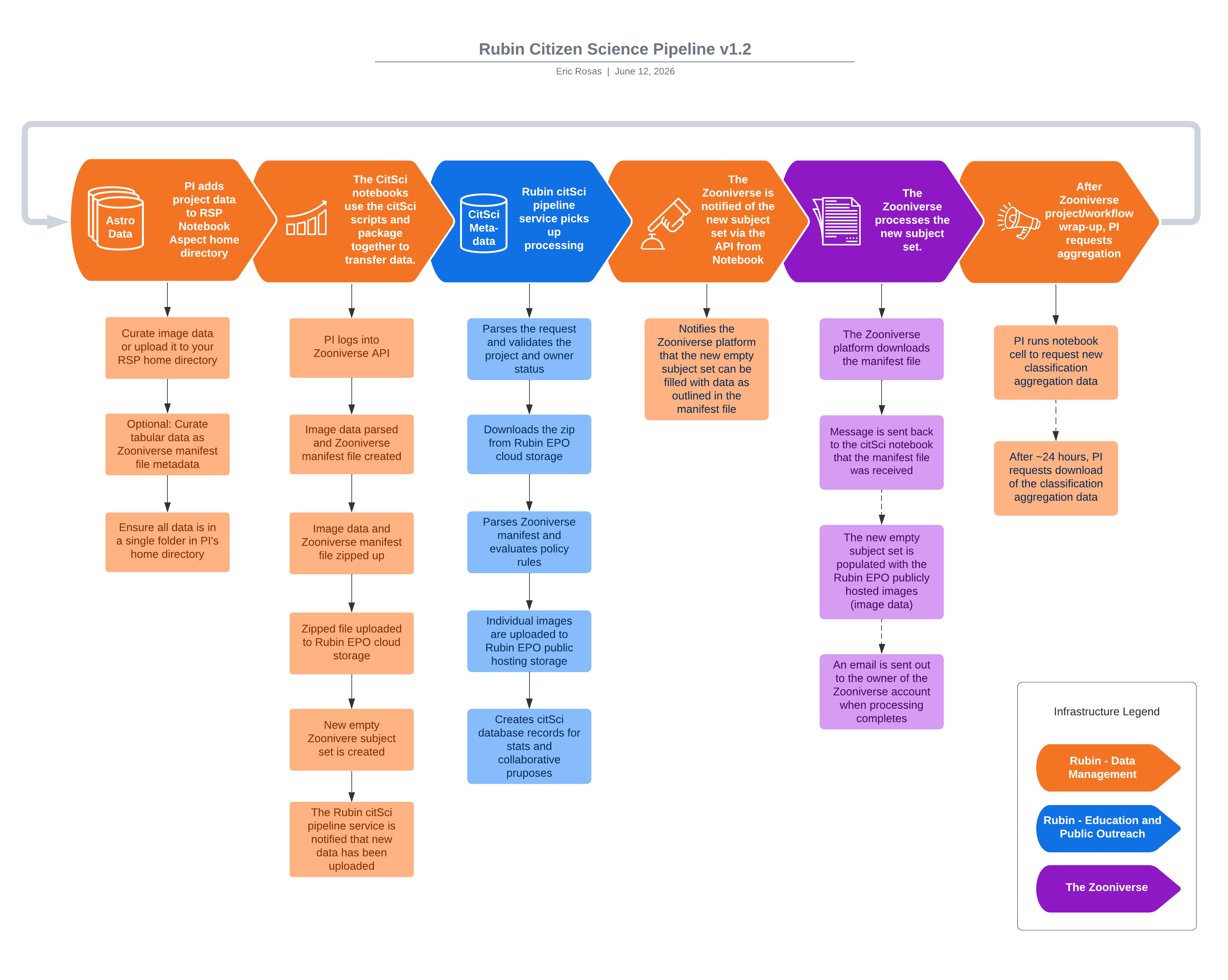
All steps in the orange columns are actions taken by project owners in the RSP Notebook Aspect. All steps in the blue and purple columns happen automatically behind-the-scenes in the Rubin citizen science pipeline or on the Zooniverse platform.
Where can I use the citizen science notebooks/pipeline?#
As of July 2026, the citizen science notebooks will work automatically in “the cloud” instance of the RSP Notebook Aspect at https://data.lsst.cloud, and with some minor additional steps in the UKDF instance at http://rsp.lsst.ac.uk/. The notebooks cannot be run at the USDF (https://usdf-rsp.slac.stanford.edu/) at this time. The notebooks will not function in any other environment including on your local device.
What software do I need to run the citizen science tutorial notebooks?#
The easiest way to get started is to clone the lsst-epo/citizen-science-notebooks repo into your home directory in the RSP Notebook Aspect. The repo contains not only the notebooks, but also a utility helper script that is referenced in the tutorial notebook. The utility helper script provides time-saving convenience functions designed to demonstrate TAP and Butler query usage, Zooniverse manifest file creation, among other items.
The long-term plan is for these notebooks to be deployed automatically in the RSP ~/notebooks/tutorial-notebooks folder by default.
What prerequisite steps are necessary to use the citizen science tutorial notebooks?#
You must have an account for the RSP Notebook Aspect at https://data.lsst.cloud or https://usdf-rsp.slac.stanford.edu/
You must have a Zooniverse account
What kind of data can be sent using the citizen science tutorial notebooks?#
Currently only two types of datasets can be sent:
Static cutout images
“flipbook” image series
There are plans to also provide at a later date:
A machine learning notebook
A notebook that makes use of alert broker data
The Zooniverse refers to these datasets as “subject sets” and each flipbook or static cutout is referred to as a “subject”.
Where is the citizen science data stored?#
One of the benefits of working with Rubin EPO is you will get free data hosting in the EPO Data Center (EDC). Your image data is stored in EPO’s cloud storage and hosted there and is publicly available for Zooniverse’s project builder. Your project data will automatically be uploaded to the EDC if you use the citizen science notebooks as a starting place, or you can request for assistance in manually uploading your project data.
What are the “citizen science notebooks”?#
EPO and the Rubin Community Science Team (CST) have prepared example Jupyter Notebooks that can be run in the RSP Notebook Aspect and demonstrate specific use cases for curating data for a citizen science project. If you do use one of the citizen science notebooks as a starting place you automatically have your Zooniverse manifest file created, your image data zipped up and uploaded, and Zooniverse will be noticed automatically of the new subject set and will begin building it immediately. When your Zooniverse workflows are completed for each subject set you can even use the notebooks to request a classification export from the Zooniverse. The notebooks are also kept up-to-date with the latest updates to the Rubin Data Products (TAP query service, Butler, image cutout service, etc.).
How much data can I send at one time using a Rubin citizen science notebook?#
Initially, you can only send 100 subjects using the notebooks. After contacting the Rubin EPO citizen science team, you can send 10,000 subjects at a time. You may send more than 10,000 subjects at a time, but you must first reach out and request an “excess data exception” from Rubin EPO. The Rubin EPO citizen science team can be contacted on the Rubin Community Forum or via email at rubincitsci@noirlab.edu.
What if I don’t want to use the citizen science notebooks?#
Using the citizen science notebooks is the easiest way to upload your data, but EPO can still assist in getting your data into the EDC for public storage/hosting should you choose not to use the notebooks. The most common use case for this is transferring data from the USDF, where the citizen science notebooks are not functional, to the EDC. Transferring the data is often a collaborative effort, but an EPO resource will be able to assist. After the upload you will be responsible for assembling the Zooniverse manifest file referencing the uploaded image URLs.
If I lose track of my data can EPO provide a backup copy?#
Yes, should you lose your data after using a citizen science notebook to upload it to the EDC then EPO can provide the original uploaded zipped copy by request.
What kind of information is collected and stored in the EPO citizen science database when using a citizen science notebook?#
The most identifiable piece of information we collect is email address and we use that to associate uploaded datasets to individuals who use the notebooks and their Zooniverse projects. We keep records of project owners, metadata about their Zooniverse project(s), metadata about the subject sets the owners upload, and data that helps us identify crossover between projects to encourage collaboration.
Can I request for my data to be purged from the EPO Data Center cloud storage?#
Yes, the Rubin EPO team can purge your data upon request.
Are there additional resources available from Zooniverse?#
Yes, please see the Zooniverse Resources page for items including Zooniverse logos and instructions on how to cite the Zooniverse.
Is there a way to notify Zooniverse of a publication resulting from a Rubin CitSci project?#
Yes, submitting the Zooniverse Publications Google Form will notify Zooniverse of your new publication that benefitted from Zooniverse crowdsourcing, and your publication will also appear on Zooniverse’s publication list.
Does Zooniverse provide best practices for closing out a CitSci project?#
Yes, see the Zooniverse Closing Out Thoughtfully webpage.